
Quickstart
A working API call in five minutes.
UnoRouter serves 200+ models from OpenAI, Anthropic, Google, DeepSeek, Qwen and 50+ providers on one OpenAI-compatible endpoint. Switch models by changing one string. Many are free and need no card.
The built-in chat runs free models without signup. Conversations stay in your browser.
Point any OpenAI-compatible client at these two values:
| Variable | Value |
|---|---|
BASE_URL | https://api.unorouter.com/v1 |
API_KEY | The key you create on the Tokens page |
Tools using a native protocol take the bare domain, without /v1: Claude Code uses ANTHROPIC_BASE_URL, Gemini CLI uses GOOGLE_GEMINI_BASE_URL. Each integration guide gives the exact value.
Sign up, open the Tokens page, create a key. It is shown once.
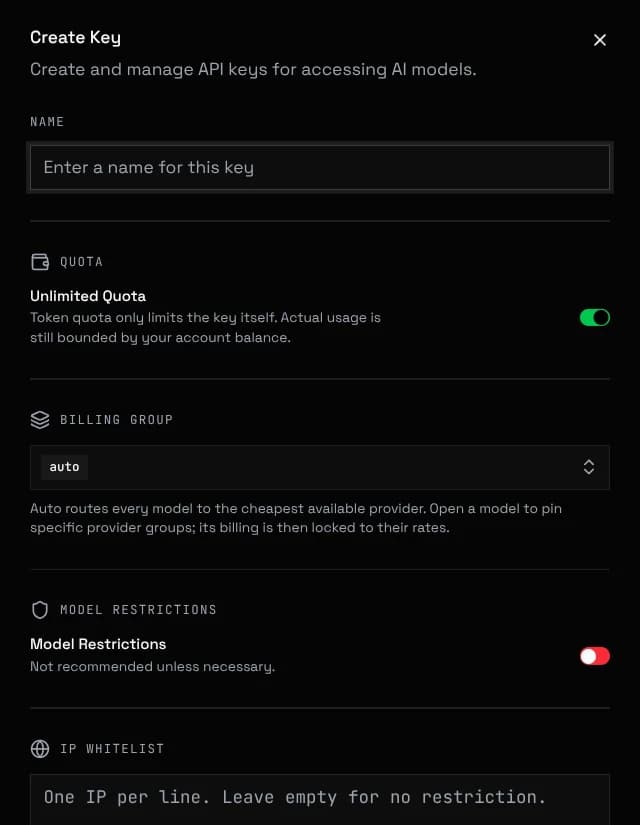
Expiry dates, spending limits, model allowlists, IP restrictions and provider group pinning are covered in Account & Billing
The built-in chat works without a key on free models. API requests always need one.
Replace YOUR_API_KEY with your key (filled in below if you are logged in):
curl https://api.unorouter.com/v1/chat/completions \
  -H "Content-Type: application/json" \
  -H "Authorization: Bearer YOUR_API_KEY" \
  -d '{
    "model": "gpt-oss-120b:free",
    "messages": [{ "role": "user", "content": "Hello!" }]
}'Models ending in :free cost nothing. Any other model uses your balance.
Any OpenAI SDK works unchanged. Set the base URL and key:
Python
from openai import OpenAI

client = OpenAI(
    base_url="https://api.unorouter.com/v1",
    api_key="YOUR_API_KEY",
)

completion = client.chat.completions.create(
    model="gpt-oss-120b:free",
    messages=[{"role": "user", "content": "Hello!"}],
)
print(completion.choices[0].message.content)Node.js
import OpenAI from "openai";

const client = new OpenAI({
  baseURL: "https://api.unorouter.com/v1",
  apiKey: "YOUR_API_KEY",
});

const completion = await client.chat.completions.create({
  model: "gpt-oss-120b:free",
  messages: [{ role: "user", content: "Hello!" }],
});
console.log(completion.choices[0].message.content);Integrations has setup for 30+ apps including SillyTavern, JanitorAI, Claude Code and Cline. Chat documents the built-in roleplay client.
For how pricing, discounts and availability work, read Models & Pricing
Before you ship, skim the status codes and rate limits in Rate Limits & Errors